Services and extras
Setup, personalization, extended support, or any service the merchant provides under its own terms.
Show a clean order summary with a simple switch for an optional add-on, like gift wrap, priority handling, or a service you provide. Shoppers see the price, switch it on, watch the total update, and continue to Shopify Checkout.
Classic Brown · one of ten styles. Try the switch.
The add-on appears with its price and a simple switch. Shoppers can turn it on or off at any time, and the total updates instantly before Shopify Checkout.
Merchants can configure an optional product or service. They set its price, terms, and fulfillment.
Choose what you want to offer, match the card to your brand, and turn it on for your cart page or drawer. CartArmor handles the switch and shows you the results.
You can create a dedicated product or select an existing Shopify variant. Review its product visibility and storefront settings before offering it.
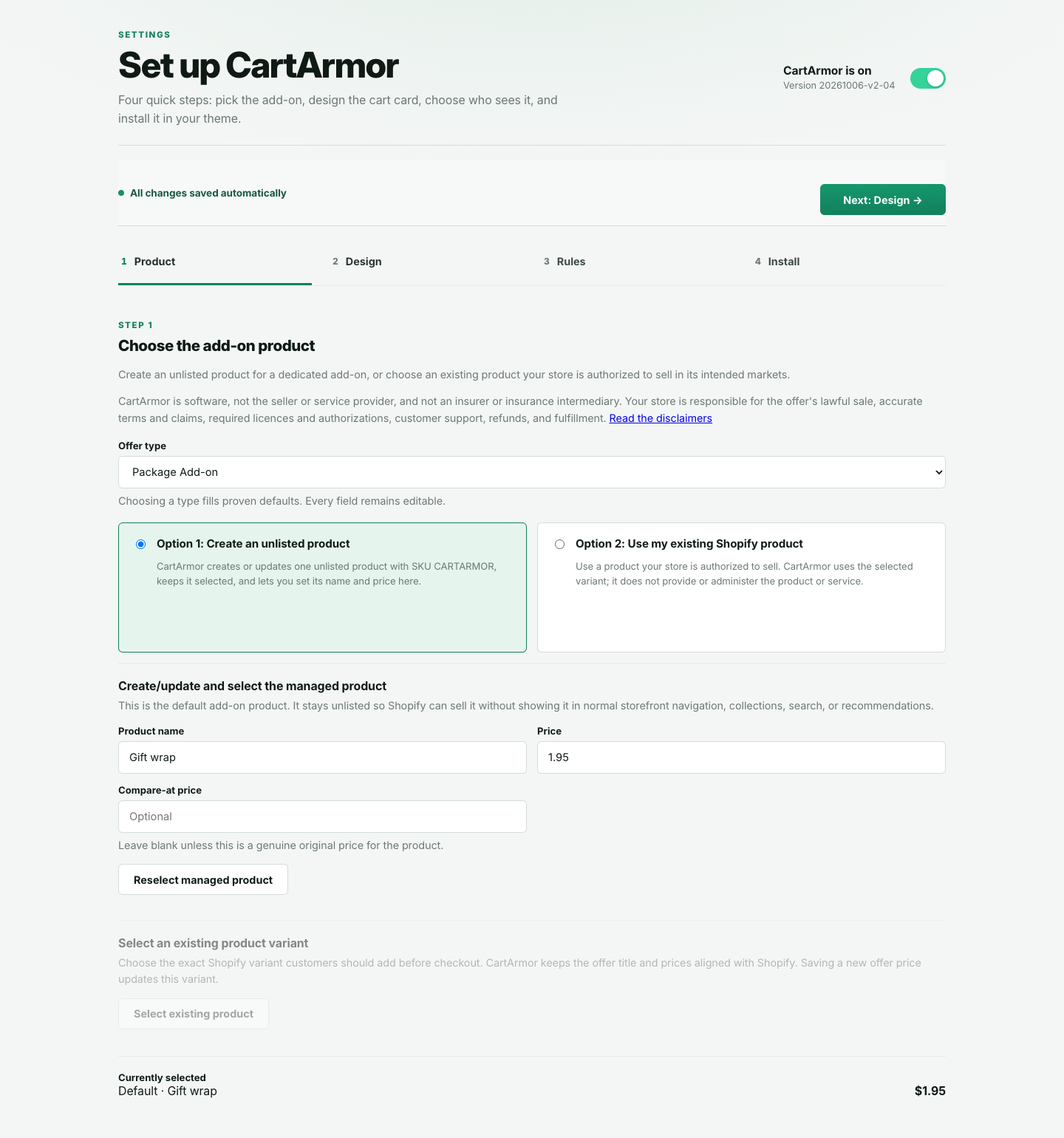
Current CartArmor interface · sample store. Click to enlarge.
Pick a style, edit every line of text, and watch the preview update as you type. Merchants set the product, price, description, and fulfillment. Nothing is added to the cart until the shopper switches it on.
Illustrative example. Tap a style, then try the switch.
CartArmor combines a cart offer with controls for its product, buyer-facing copy, style, theme placement, and aggregate activity inside Shopify.
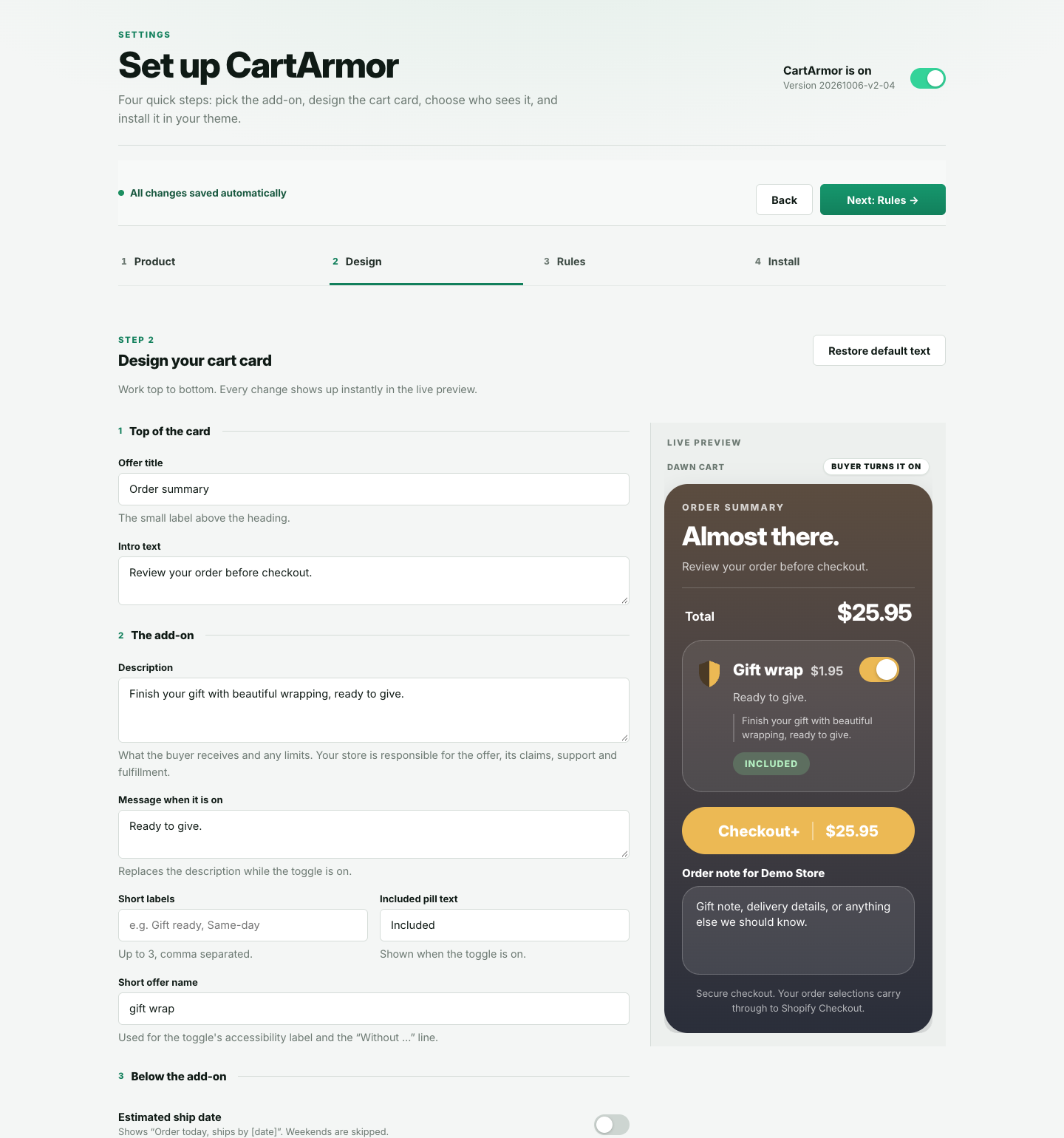
Design your offer and preview each edit. Sample store.
CartArmor displays a merchant-selected product or service before Shopify Checkout. The merchant sets its price, terms, claims, and fulfillment.
Setup, personalization, extended support, or any service the merchant provides under its own terms.
Offer a merchant-provided gift wrap or message option as a separate Shopify product.
Describe any handling service accurately and fulfill it under the merchant's stated terms.
Let buyers choose a packaging add-on when its details and price are clear.
Use an existing Shopify product or a dedicated product for an optional cart add-on.
Merchants are responsible for product claims, delivery, customer support, and applicable legal requirements.
One flat plan with every feature. Start with a 7-day free trial, billed through Shopify, and cancel anytime.
One price, no tiers and no order limits. Billed monthly on your Shopify invoice.
Install from the Shopify App Store · no code changes to your theme · Shopify taxes may apply
Your offer, its design, and its results, all inside your Shopify admin.
The product is designed around explicit customer choice, Shopify-native primitives, and the smallest practical permission surface.
By default, nothing is added unless the shopper switches it on.
Accepted services continue through Shopify as normal cart items.
The integration ships through a Shopify theme app extension.
CartArmor works before checkout and does not replace Shopify checkout.
Choose an optional service, match the offer to your store, and let customers decide before checkout.
We can provide CartArmor for other ecommerce platforms, headless storefronts, custom stores, and static websites connected to a cart or checkout. Tell us what your site runs on and we will recommend the right version.